Attendance deep dive: states, QR operations, corrections, and stats
How the four attendance states keep stats fair, running rotating QR codes on site, proxy check-in and corrections, automatic no-show handling, and reading the accumulated records.
· five:hours
Attendance is the heart of Bulsee — but "came / didn't come" isn't enough to actually run a group. Late and excused need to be distinct, QR must resist spoofing, and no-shows should be caught automatically. Part 4 of the deep-dive series covers attendance from the operator's seat. For the pros and cons of each method, see Check-in methods compared; here we focus on running it.
Four attendance states
| State | Meaning |
|---|---|
| Present | Attended normally |
| Late | Arrived late |
| Absent | Didn't attend |
| Excused | Missed with an accepted reason |
Excused is the one that matters. Separate injury-or-business-trip absences from plain absences and your attendance stats and challenge rulings stay fair. Rules last when the system can express "missed, but not penalized".
Self check-in — the default
When the event starts, members check in themselves in the app — no roll call, no roster in the operator's hand. Members can't check in to events from before they joined, so a mid-term joiner's rate is never dragged down by history they weren't part of.
QR check-in — the standard for on-site
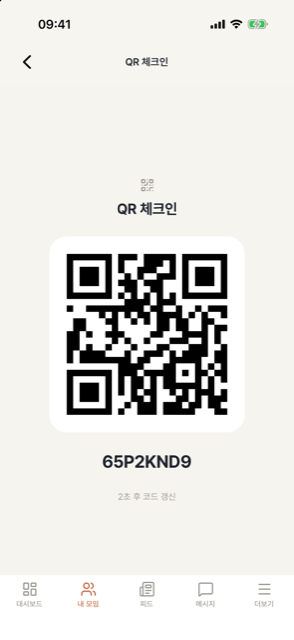
For offline venues, put the admin QR screen at the entrance (tablet or phone both work).
- The QR refreshes every 30 seconds, so photographing it for a friend outside doesn't work.
- Members scan with their own phone and are marked present instantly; manual code entry covers camera trouble.
- Events that must block proxy attendance can be set QR-only, disabling self check-in.
Proxy check-in and corrections — the admin's finishing pass
- Admins can check in on behalf of a member with a dead battery or no phone.
- After the event, admins correct states on the attendance sheet — unchecked members to absent, verified reasons to excused.
No-shows are caught automatically
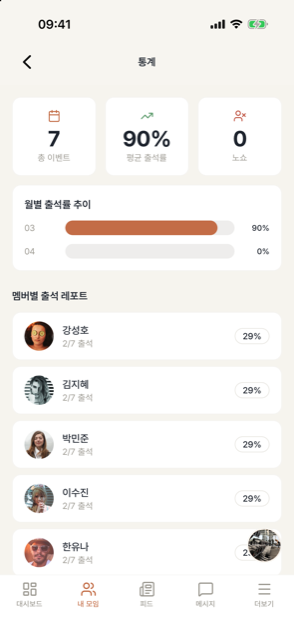
Members who signed up but never showed are marked absent (no-show) automatically after the event ends, and per-member no-show counts accumulate. No more cross-checking "who booked but didn't come" — repeat offenders surface as data.
Reading the records
- Per-event status: live on the event screen (present 10/12 and so on).
- My attendance history: each member checks their own rate and records — "how many times did I attend?" questions disappear.
- Streaks: consecutive-attendance indicator, great fuel for challenges.
- Members needing attention: surfaces members who haven't participated lately, so churn shows up as data, not a hunch.
Next: Creating quizzes