Creating events: recurring schedules, capacity, and waitlists
Automate weekly scheduling with recurring templates, set capacity with automatic waitlist promotion and sign-up windows, and wire up reminders and calendar sync.
· five:hours
If you create this week's schedule by hand every Monday, this guide removes that job. Events in Bulsee aim for "set once, generated automatically". Part 3 of the deep-dive series covers one-off events, recurring templates, and capacity-limited sign-ups.
Creating a one-off event
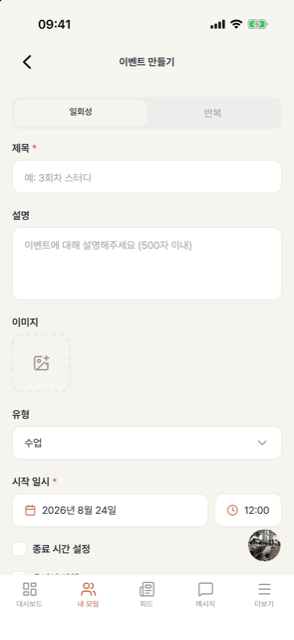
Admins create an event with just a title, time, and place — a map address for offline, or an online flag for remote sessions. The event appears on every member's dashboard calendar, and its status (upcoming / ongoing / ended) updates by itself over time.
Events that need sign-up — capacity and waitlist
For events with limited seats, enable sign-up and set a capacity.
- Once full, later applicants automatically go on the waitlist.
- When someone cancels, the waitlist promotes in order automatically and the promoted member gets a notification. No admin intervention.
- Separate open and close times for sign-up automate rules like "booking opens 3 days before".
- Sign-ups can't be canceled after the event starts, which stops last-minute no-show cancellations.
On sign-up events only registered members can check in. For drop-in groups (study sessions, runs), leave sign-up off and just use check-in.
Recurring event templates — schedule generation on autopilot
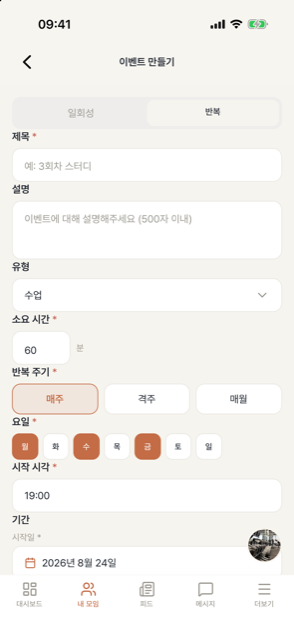
Register regular schedules as a recurring template.
- Cadence: weekly / biweekly / monthly, with multiple weekdays (e.g. Mon·Wed·Fri).
- Generate at once: create every event up to an end date immediately — ideal for fixed-term cohort classes.
- Rolling generation: keep a few days of upcoming events generated automatically each day — ideal for open-ended schedules like academy classes.
- Fixed members: designate regulars and every generated event registers them automatically.
For a taekwondo academy with daily classes, "Mon–Fri rolling + regulars as fixed members" is the whole setup. Time, place, and capacity live in the template, so nothing is re-entered.
Reminders and calendar sync
- About an hour before start, participating members get a push reminder — fewer "oops, forgot" no-shows.
- Save any event as a calendar file (.ics), or subscribe to your full schedule from Google Calendar and friends.
Need to decide something? Polls
Events can carry polls. Dinner menu, afterparty yes/no, next session's topic — collect opinions in the event instead of the chat room, and the result stays on record.
Next: Attendance deep dive