Running passes: issuing, auto-deduction, refunds, and renewals
Credit, period, and unlimited passes compared; the automatic deduction and refund rules tied to sign-ups and check-ins; low-balance and expiry notifications; renewal requests.
· five:hours
"How many sessions does she have left?" — if you manage class passes in a ledger or spreadsheet, you know the missed-deduction, reconciliation grind. Passes in Bulsee hook into sign-ups and attendance so deduction and refund run themselves. The final part of the deep-dive series covers pass types, the automatic deduction rules, notifications, and renewals. For the academy-flavored intro, see Automating class passes.
Turning passes on
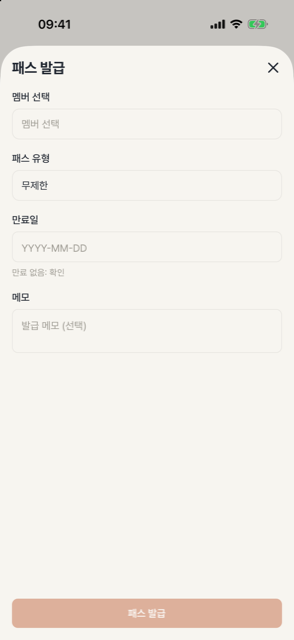
Passes are an optional feature, off by default. Enable them in group settings and the issuing menu appears. In a pass-enabled group, a valid pass is required to sign up — structurally ending "keeps attending without a pass".
Three types
| Type | How it works | Best for |
|---|---|---|
| Credit | One credit per participation | 10-session pilates packs, coupon classes |
| Period | Unlimited until expiry | Monthly passes, 3-month cohorts |
| Unlimited | No limits | Staff, long-term members |
Admins issue passes to specific members. A future start date lets you schedule "valid from the 1st".
Automatic deduction and refunds — hands off
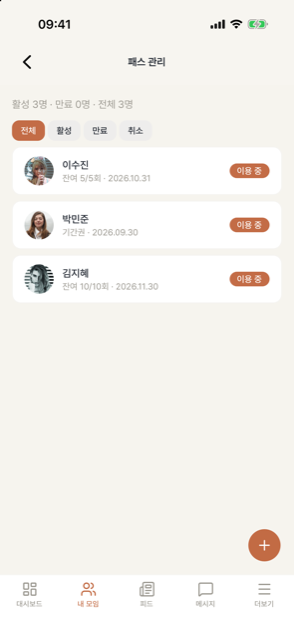
Credit passes deduct and restore entirely on their own.
- A confirmed sign-up deducts one credit. Waitlisted members are not charged until the moment they're promoted into a seat.
- Canceling refunds the credit — and a pass that had expired on its last credit reactivates when refunded.
- Events without sign-up deduct at check-in instead. One participation never deducts twice.
- Every deduction and refund is logged, visible to member and admin alike — "why was I charged?" disputes resolve themselves in the history.
Notifications — before expiry, not after
- Credit passes at 3 or fewer remaining notify the member.
- Period passes send an expiring-soon notice 7 days before expiry.
You never ring around with "your pass is about to expire" — the system creates the renewal moment for you.
Renewal requests — the path to re-enrollment
Members near expiry can send a renewal request from the app. It lands as a notification to admins, who respond by issuing the next pass. For a 3-month cohort class, "cohort ends → renewal request → next cohort's pass" completes inside the app.
Wrapping up the series
That's the full operating loop — create a group → invite members → events → attendance → quizzes → passes. To start from the top, head back to the group setup guide.